Interactive real estate presentation: how a digital master plan works
Updated:
An interactive real estate presentation is a web page where the buyer explores a project on their own: map, zones, apartments or villas, photos and video, all behind one link. GenPlan builds it as a digital master plan that opens in any browser on a phone, tablet or computer, with no install.
With ready visualizations a base project launches from 2 weeks, and the finished site archive is handed over to the client.
GenPlan is an interactive digital master plan for real estate: map, plans, video and photos in one link, no install.
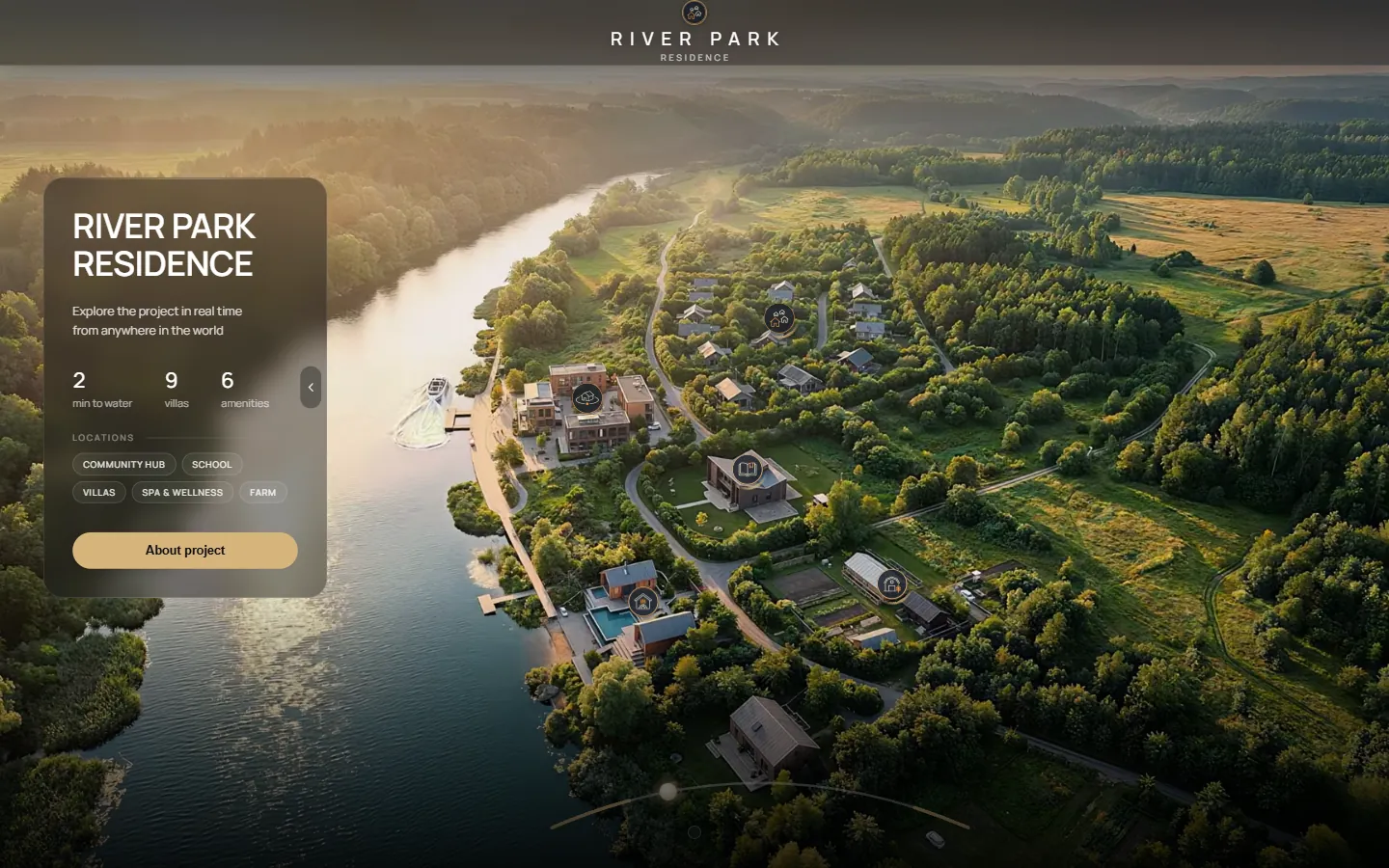
How does it work for the buyer?
The buyer opens the link and lands on an animated intro or a map of the project. A click on a villa, zone or location opens a point with a gallery of up to 4 renders, photos or videos. The sales tool adds clickable apartments with filters by price, bedrooms, size and orientation, an Available / Sold status and a built-in chat.
On a phone the same project opens in its own vertical layout with a bottom sheet, so the map stays visible while the details sit below. Questions from the buyer go through the feedback module straight to your sales team.
What is included in a GenPlan project?
The base is a ready platform plus up to 10 options from the catalog. Everything below is taken from the current project scope.
| Part | What it contains |
|---|---|
| Base platform | Animated master plan (or static on request); navigation with zone outlining and highlighting by category; icons in the project's brand style; filtering to find objects quickly; English plus 1 language of your choice; feedback module connected to your sales department. |
| Work with your materials | Professional refinement of the renders you provide; text for each selected zone; up to 4 animated video clips in each location. |
| Catalog options | Area map with distances, construction stages slider, architectural x-ray (layout through the roof), media point gallery, day and night cycle, 360° view, sales tool with apartment statuses. |
| Delivery | A working link; the complete site archive can be handed over for your own hosting. 100% ownership. |
The full list of options is on the interactive master plan page; how the price is formed is explained on the pricing page.
How is it different from a PDF, a 3D tour and a regular website?
A PDF shows fixed pages in a fixed order. A 3D tour is about walking through one space. A regular website splits a project into pages. A digital master plan keeps the whole territory on one screen and lets the buyer choose the route.
| Format | What the buyer gets | Where it stops |
|---|---|---|
| PDF presentation | Fixed pages, one path | No live statuses; a heavy file to send |
| 3D virtual tour | Movement through one space | A territory with zones, statuses and city context is not its job |
| Regular website | Text and gallery pages | The map and zones are not the structure of the page |
| GenPlan digital master plan | The territory as one map; every zone opens in detail | Needs renders, a model or drawings as input |
A criterion-by-criterion table is on the comparison page.
Who is it for?
Developers of villas, resorts, residential complexes, eco-projects and large master plans, and their sales teams. The system works equally well for a single property or a complex with 200+ apartments. 3D studios and agencies can offer GenPlan to their clients under their own brand: see white-label.
How long does launch take?
With ready visualizations a base project launches from 2 weeks; a typical GenPlan project is ready in about two weeks from the moment the materials are received. If there are no renders yet, the platform can also be built from a 3D model or from drawings alone (DWG/DXF, PDF plans), which takes longer. The exact timeline is fixed when the scope is agreed.
- You send what you have: renders, a 3D model or drawings, in any format.
- We agree on scope, options and timeline in a short call or chat and you get a quote and a schedule.
- You get your link and the full archive.
Does the buyer need to install anything?
No. The platform runs in a regular browser on smartphones, tablets and computers. You send one link: no app, no download, no sign-up.
What happens to the client's data?
You get a working link. If you prefer to host the project yourself, we hand over the site archive, and the site is then stored on your hosting. Unit statuses and leads can sync with your CRM or a spreadsheet: in the Live Status option a status changed in the table recolours the villa on the plan, and requests go back to the CRM or the table.
The video at the top of the page is the Live Status option of the River Park Residence project.
Where can I see it live?
Each project below is a working platform, not a render. Open a demo and explore it yourself, or read the case. Projects are also placed on the GenPlan globe.
| Project | Type and place | Scale | Links |
|---|---|---|---|
| River Park Residence | Villa community, Central Europe | 9 villas · 6 amenities · 2 min to the water | Live demo · Case |
| Resort Master Plan | Resort, Morocco | 3 zones · 8 locations with galleries | Live demo · Case |
| SEN City Map | City tower, Da Nang, Vietnam | 5 city landmarks · routes from 1.8 to 27 km | Live demo · Case |
Questions and answers
What types of property does an interactive presentation suit?
Any real estate that has to be presented to clients or investors: villas, resorts, residential complexes, eco-projects and large master plans. It works equally well for a single property or a complex with 200+ apartments.
Can unit statuses be connected to a CRM?
Yes. The Live Status option shows Available, Reserved, Sold and On hold on the plan, and price, area and status are updated from a spreadsheet or any CRM in real time. Requests from the project go back to the CRM or the table.
What if I have no renders yet?
The platform can be built from a 3D model or from drawings alone (DWG/DXF, PDF plans). It takes longer than starting from ready renders.
Who owns the finished platform?
You do. You get a working link, and the complete site archive can be handed over to you for your own hosting.
See also
Tell me about your project
Write on Telegram, WhatsApp or by email. I reply within the day with a plan and a timeline.