Interactive master plan for developers: what a digital master plan includes
Updated:
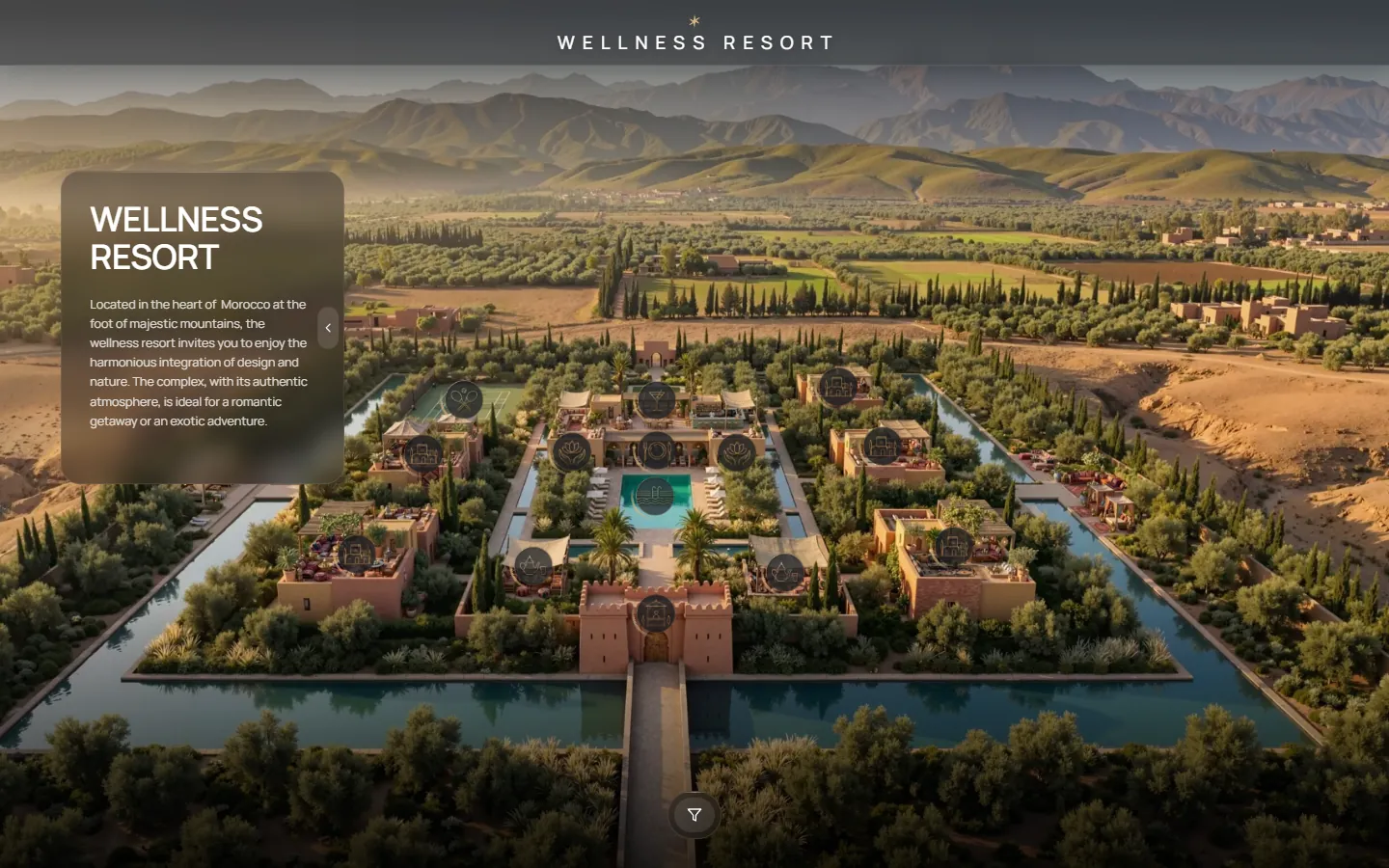
An interactive master plan, which GenPlan calls a digital master plan, is the web version of a development's master plan: every zone, building, villa or apartment is a clickable point, and the whole project opens from one link in any browser.
The buyer chooses the route: from the territory to a zone, from a zone to a location or a unit, with photos, video and layouts at each step.
GenPlan is an interactive digital master plan for real estate: map, plans, video and photos in one link, no install.
What is the difference from a static master plan drawing?
A drawing or a PDF master plan shows the layout once, in one state. In a digital master plan the same layout reacts to the viewer: zones are highlighted and filtered, points open galleries and video, the time of day and the season can change, and unit statuses follow your table or CRM. It is a sales tool and not only an illustration.
The basic idea is described on the interactive real estate presentation page.
What does an interactive master plan consist of?
The core is the same in every project; options are added from the catalog.
| Block | What the buyer sees |
|---|---|
| Core: zones and navigation | Animated or static master plan; zone outlining and highlighting with category separation; smart filtering to switch between object categories |
| Core: locations and infrastructure | Parks, spa, coworking, pools, sports zones, each opening as a point with photos and video (up to 4 clips per location) |
| Core: 360° and floor plans | 360° flythrough of key buildings; interactive floor plans: exterior, floor plan and interior in one click |
| Option: area map | City context, points of interest and distances; each point opens with photo and video |
| Option: construction stages | Year-by-year slider from groundbreaking to handover. It is a presentation visualization and does not replace the official construction schedule |
| Option: sales tool | Clickable apartments, filters by price, bedrooms, size and orientation, Available / Sold status, apartment card, built-in chat |
| Option: living environment | Water, boats, lighting, day and night cycle |
| Option: nested master plans | A detailed view of every building on click |
| Option: branded interface and languages | Your colors, logo and fonts; multi-language support (RU / EN / AR / ES) |
The base includes the platform and up to 10 options; see how the price is formed.
Where is it used?
| Scenario | How it is used |
|---|---|
| Sales office | Open the plan on a screen and walk the client through the plot and the units |
| Zoom calls and messengers | Share the screen or send one link; it opens on a phone, tablet and computer |
| Exhibitions and conferences | Run it full screen on a display |
| Social media and ads | Use the link as the destination of a targeted ad |
| Company website | Publish it as the main presentation page of the project |
For a step-by-step approach to online calls, read how to show a master plan on Zoom calls.
Which projects does it suit? Three examples
The three live projects show three different tasks. Each has a working demo and a case page.
| Project | Task | Scale | Links |
|---|---|---|---|
| River Park Residence | Sell villas through the setting: river, greenery, distance to the water | 9 villas · 6 amenities · 2 min to the water | Demo · Case |
| Resort Master Plan | Show a whole resort territory as one map, with every zone as a step into detail | 3 zones · 8 locations with galleries | Demo · Case |
| SEN City Map | Sell a city tower through its location: distances to the sea, the airport and the centre | 5 city landmarks · routes from 1.8 to 27 km | Demo · Case |
Does it work for one house, not a whole complex?
Yes. The system works equally well for a single property and for a complex with 200+ apartments. The set of options is chosen to match the task.
What materials are needed to start?
Renders, a 3D model or drawings, in any format. With ready renders a base project launches from 2 weeks. From a 3D model or from drawings alone (DWG/DXF, PDF plans) it takes longer; the timeline is fixed when the scope is agreed.
Questions and answers
What is a digital master plan?
It is a web presentation of a development. The territory, buildings, plans, photos and video are shown on one page behind one link, instead of a folder of files.
Can unit statuses be updated without a developer?
Yes. In the Live Status option price, area and status are edited in an ordinary spreadsheet or in any CRM, and the master plan updates in real time.
Do buyers need an app?
No. It opens in any modern browser from a link, with no app and no plug-in.
See also
Tell me about your project
Write on Telegram, WhatsApp or by email. I reply within the day with a plan and a timeline.